

Getting Started with Prayer Mate: A Simple Guide
Most of us, if we’re honest, struggle at times to pray consistently. Stories of exceptional “prayer warriors” can even make that struggle feel worse—discouraging rather than motivating. My own problem is simple: when I pray quietly, my mind wanders. I’m a visually oriented person, and focus comes more easily when my eyes have something to lock onto. A written prayer list is a time-honored solution, but it has drawbacks. It isn’t always with you, it needs constant maintenance, and over time it becomes cluttered.
I don’t usually review software. But I recently discovered an app that has genuinely helped me pray with greater consistency and focus. The app is called “Prayer Mate”, from Discipleship Tech led by Andy Geers. It has been around since 2017 and is available for iPad, iPhone, and Android devices.
PrayerMate helps by doing four simple things well:
- It organizes prayer into categories (personal, church, global), so you’re not trying to hold everything in your head at once.
- It surfaces a manageable subset of those prayers in each session, rather than presenting one overwhelming list.
- It supports consistency through reminders and scheduled rotation (daily, weekly, etc.).
- It can pull in suggested content (for example, ministries or prayer feeds) so you’re not starting from zero.
Used this way, PrayerMate functions less like a static prayer list and more like a structured prompt for daily prayer.
You begin by tailoring lists to your own concerns. From there, you add specific people or requests, then use reminders and scheduling so important items recur at the right frequency. As needs change, you update the content—not the whole system.
PrayerMate isn’t complicated, but it isn’t immediately intuitive either. What follows is a brief, practical guide to getting started.
1. Understanding lists
PrayerMate works like a simple outline, but the terminology matters. You are not working from a single prayer list, but from a set of lists. Each list represents a broad category of prayer and functions as the top level of the hierarchy. When you first install the app, you’re presented with several default lists, such as My Church, Biblical Prayers, and World Mission. When you first install it, you are presented with a set of 6 default “lists”, as shown here:
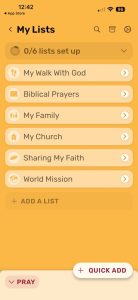
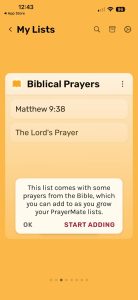
Tapping a list—say, Biblical Prayers—reveals that it’s already populated with a few example entries. PrayerMate also prompts you to begin adding your own content.
Returning to My Lists brings you back to the top level. Selecting a different list, such as My Church, opens an empty space where you can begin organizing prayers specific to that area.
The key idea to keep in mind is this hierarchy:
List → Subject → Item (card)
Everything else in PrayerMate builds on that structure.

2. Add subjects to your lists
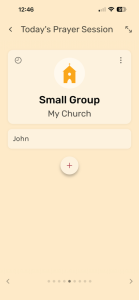
Within each list, you create subjects. Subjects act as groupings for related prayer items. Tapping Add to list brings up the keyboard and allows you to create a subject—for example, Small Group under the My Church list.
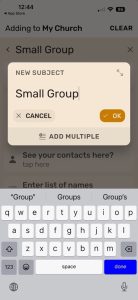
At this stage, the subject exists but contains no prayer items. The next step is to add those items.

3. Add Items to your subjects
Tapping Add item presents several options. This is where PrayerMate becomes especially flexible. You can add a simple prayer request using a new card, set a reminder, or attach an external document such as a missionary prayer letter or a shared prayer list.
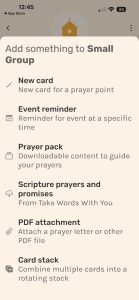
Selecting New card allows you to enter a name or specific request. Once added, that item becomes part of the subject and will be included in future prayer sessions according to your scheduling settings.

After tapping “add”, we see the completed action here:
4. Add the feeds that interest you
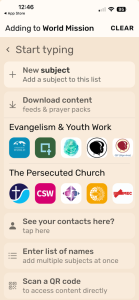
PrayerMate can also supply content automatically through partnered ministries. For example, selecting World Mission and tapping Add item reveals an option to Download content. This allows you to subscribe to prayer feeds from organizations such as Cru, InterVarsity, and Open Doors. Suggested feeds are tailored to the list you’re working in, and you can also search for additional content using the search box at the top. These feeds are optional, but they can be helpful if you want to broaden your prayers without having to curate everything yourself.
5. Beginning a prayer session.
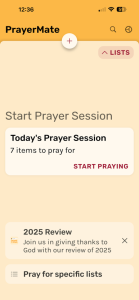
Once your lists are in place, you can begin a prayer session by returning to My Lists and tapping Pray, or simply by closing and reopening the app. PrayerMate walks you through several screens: starting the session, reviewing the items selected for that session, and then swiping (from right to left, like a book) to move through individual prayer cards.
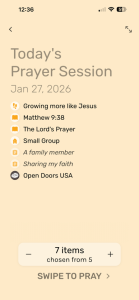
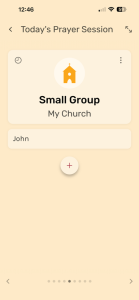
The prayer screen itself can be confusing at first if the hierarchy isn’t clear. The bold text at the top is the subject. Beneath it is the list. The items that follow are individual items—the specific people or requests you’re praying for.
Conceptually, the screen above could be outlined as:
- My church
- Small Group
- John
- Small Group
PrayerMate does not present everything at once. Items rotate according to your settings. If there are lists or subjects you want included every time, that’s managed in Scheduling overview under Settings (gear icon, top right).
Using PrayerMate has helped me improve my consistency in daily devotions—first by giving my eyes something to focus on, and second by linking prayer to a habit I already have. Each morning, I settle into a chair with my iPad, scan the headlines, check the weather, and pray.
If you can’t think of anything to pray for, reading the headlines should fix that.
- Does structure help your prayer life, or does it feel constraining?
- How do you balance routine with spontaneity in prayer?
- Have you tried another way of organizing prayer that worked better—or worse?
Let us know in the comment section below.